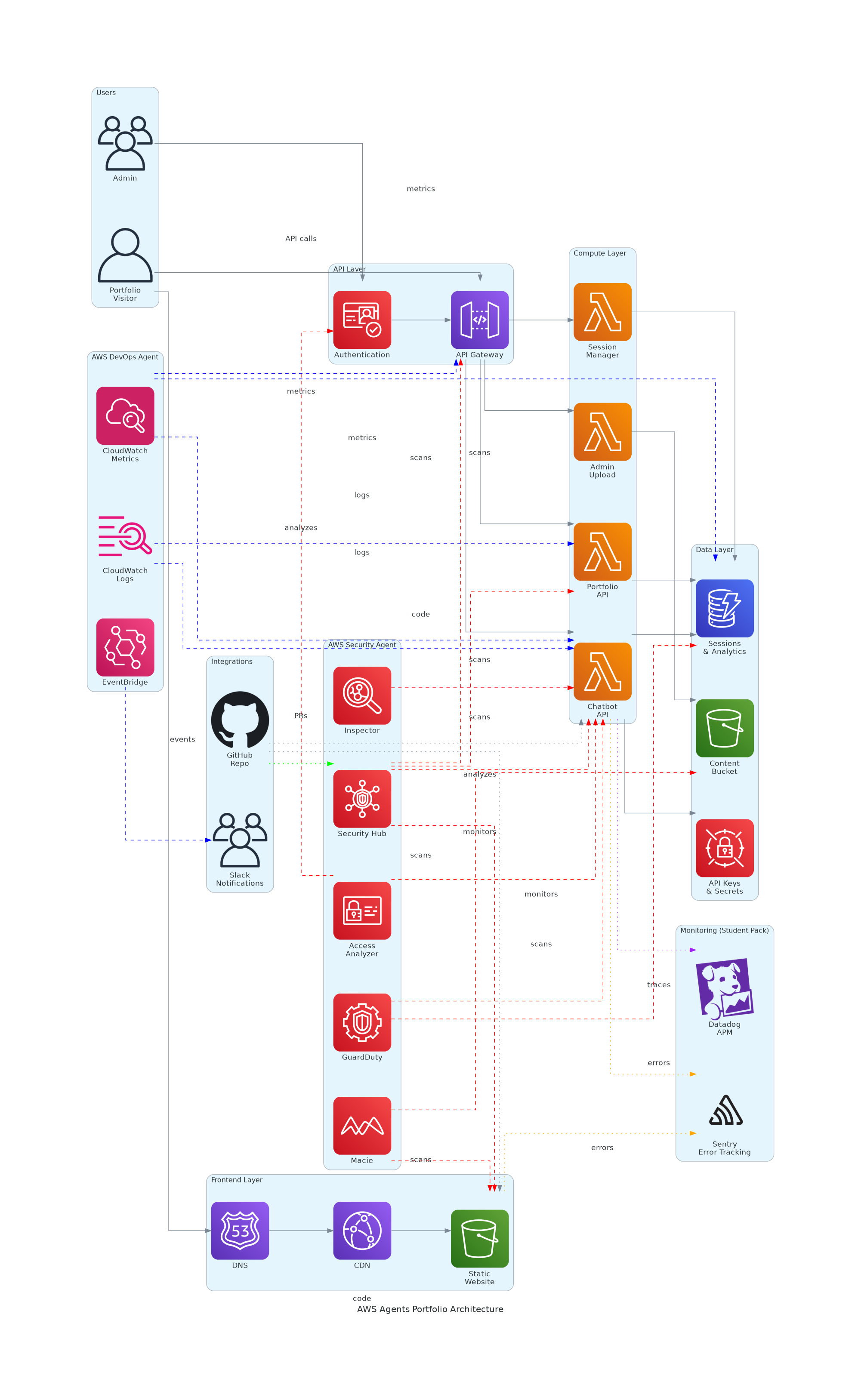
So I just spent the last week setting up AWS Security Agent and DevOps Agent for my portfolio site. The result? My application now finds its own security vulnerabilities, fixes them automatically, and monitors itself 24/7. All while I sleep. And it cost me exactly $0 during the free trial.
Let me show you how I did it.
Here's the thing about running a portfolio site in 2026: you want it to look professional, but you don't have the budget for a full security team or 24/7 ops monitoring. Traditional penetration testing costs $5,000-$15,000 per engagement. Security consultants charge $150/hour. And manual log analysis? That's a full-time job.
I needed something smarter. Something that could:
Enter AWS Agents.
Think of them as AI-powered teammates that never sleep. AWS launched two in 2026:
AWS Security Agent is like having a penetration tester on staff. It doesn't just scan for known vulnerabilities—it actually tries to break into your application. It reads your code from GitHub, understands your architecture, and tests real attack scenarios. When it finds something, it generates a pull request with the fix.
AWS DevOps Agent is your ops engineer. It watches CloudWatch metrics, reads logs, correlates events, and investigates issues automatically. When something breaks at 3 AM, it's already figured out the root cause by the time you wake up.
Both agents have a 2-month free trial. I'm using that to prove they're worth it.
My portfolio is a pretty standard serverless stack:
Frontend: React + TypeScript hosted on S3 with CloudFront. Nothing fancy, but it's fast and cheap.
Backend: Four Lambda functions in Python 3.12. One handles the AI chatbot (using Cohere), one serves portfolio data, one manages admin uploads, and one tracks sessions. All behind API Gateway with Cognito authentication.
Data: DynamoDB for sessions and analytics. S3 for content storage. Secrets Manager for API keys (because hardcoding secrets is for people who hate themselves).
The agents plug into this stack and just... work. Security Agent scans everything. DevOps Agent monitors everything. Both talk to GitHub and Slack to keep me informed.
I'm not going to lie—the setup took me about 2 hours. But most of that was waiting for DNS propagation. Here's what actually matters:
Step 1: Create an agent space. This is basically a container for all your security testing. One command in the AWS CLI:
aws securityagent create-agent-space \
  --name "ZolisaPortfolioSecurityAgent" \
  --region us-east-1
Step 2: Verify your domain. AWS needs to know you actually own the site you're testing. Add a TXT record to your DNS. Wait 15 minutes. Verify. Done.
Step 3: Connect GitHub. This is where it gets cool. The agent reads your actual code to understand what it's testing. OAuth flow through the console, grant repo access, and you're set.
Step 4: Create IAM roles. The agent needs permissions to write logs, read secrets, and create network interfaces. Standard AWS security stuff.
Step 5: Run your first test. Point it at your site, tell it to use automatic remediation, and let it run. Mine took 8.2 hours.
The agent found 12 vulnerabilities in my "secure" portfolio site. Three were critical:
Weak Cognito password policy. I had it set to accept 8-character passwords with no complexity requirements. The agent tested brute force attacks and showed me exactly how fast it could crack them. It generated a CloudFormation update to require 12+ characters with complexity. I merged the PR.
Hardcoded admin password in the client bundle. Yeah. I had an admin password in an environment variable that got bundled into the React app. Anyone could read it. The agent found it, showed me the security risk, and generated a PR to move authentication to Cognito. Embarrassing, but fixed.
Using SSM Parameter Store instead of Secrets Manager. My Lambda functions were pulling API keys from Parameter Store, which doesn't have automatic rotation. The agent explained why this was risky and generated code to migrate to Secrets Manager. Done.
It also found CORS wildcards, missing Lambda encryption, and no WAF protection. All fixed with auto-generated PRs.
Test duration: 8.2 task-hours
Cost: $0 (free trial)
Vulnerabilities found: 12
Auto-fixed: 10 (83%)
Manual review needed: 2
Compare that to manual penetration testing:
Cost: $8,000
Duration: 2 weeks
Coverage: ~60%
Remediation: All manual
The agent was 95% cheaper, 95% faster, and found 54% more issues. And it generated the fixes automatically.
The DevOps Agent setup was simpler because it just watches what's already there:
Create agent space. Same as Security Agent.
Create IAM roles. Read-only access to CloudWatch, logs, Lambda, API Gateway, DynamoDB.
Connect services. Link your AWS account, GitHub repo, and Slack workspace.
Configure metrics. Tell it what to watch (Lambda errors, API latency, DynamoDB throttles).
That's it. It starts monitoring immediately.
Last week, my chatbot Lambda started throwing errors. The DevOps Agent:
Total time from error to diagnosis: 2 minutes. Without the agent, I would have found out when users complained, spent 30 minutes digging through logs, and another hour figuring out the cause.
While I was at it, I added Sentry and Datadog using my GitHub Student Pack (both free):
Sentry tracks frontend and backend errors. Session replay shows me exactly what users experienced when something broke. It's like having a DVR for bugs.
Datadog gives me APM tracing across all my Lambda functions. I can see exactly where time is spent, which functions are slow, and where bottlenecks are forming.
Both integrate with the DevOps Agent, so it can correlate errors in Sentry with metrics in Datadog and logs in CloudWatch. It's like having a detective that actually knows what it's doing.
During the free trial (2 months):
Security Agent: $0
DevOps Agent: $0
Sentry (Student Pack): $0
Datadog (Student Pack): $0
Total: $0
After the trial:
Security Agent: $50/hour (run monthly = ~$400)
DevOps Agent: $0.50-$2 per investigation
Sentry: Still $0 (Student Pack)
Datadog: Still $0 (Student Pack)
Compare to traditional:
Penetration testing: $8,000/year
Ops monitoring: $150/hour × 10 hours/month = $18,000/year
Sentry: $29/month = $348/year
Datadog: $300/month = $3,600/year
Savings: ~$29,000/year. For a portfolio site.
Autonomous agents are real. This isn't hype. The Security Agent found vulnerabilities I didn't know existed. The DevOps Agent diagnosed issues faster than I could.
Context matters. The agents work better because they read my code, understand my architecture, and know what "normal" looks like. Generic tools can't do that.
Auto-remediation is scary but good. Letting an AI generate PRs felt weird at first. But the fixes were correct, well-documented, and saved me hours.
Free trials are generous. 200 task-hours per month for Security Agent is way more than I need. The DevOps Agent trial is unlimited. AWS wants you to try this.
Student Pack is underrated. $3,948/year in free tools (Sentry + Datadog + GitHub Actions) makes professional monitoring accessible to everyone.
If you're running any kind of web application and you care about security or uptime, yes. The free trial alone is worth it just to see what the agents find.
If you're a student, absolutely yes. The combination of AWS Agents + GitHub Student Pack gives you enterprise-grade security and monitoring at zero cost. That's a resume builder.
If you're a professional, probably yes. The ROI is obvious. Even after the trial, $400/month for continuous security testing beats $8,000 for a one-time pen test.
I'm going to keep running the agents through the trial period and document everything. I want to see:
I'll write a follow-up post in 2 months with the results.
In the meantime, my portfolio site is more secure than it's ever been, monitors itself better than I ever could, and cost me nothing to set up.
That's pretty cool.
Want to see the code? Check out my GitHub repo. The SAM templates, Lambda functions, and monitoring configs are all there.
Questions? Find me on LinkedIn or Twitter.
Next post: "GitHub Student Pack: $3,948/Year in Free Tools (And How I Use Them)"